Nexus overview
Nexus is an explorable map of business objects and their connections. Start with the overall configuration, then open an individual record to understand its current relationships, source facts and recorded activity. Operational changes remain in their source workflows.
Open Nexus
Select a site and environment and open Nexus from navigation. The same explorer is available in Operations Studio. View in Nexus links on supported orders, materials, work centers and Studio items open the corresponding context directly.
Nexus shows only configuration and records you can access in the selected workspace. Each source keeps its own permissions and restrictions; opening a map does not grant access to an order or its documents.
Choose the question you want to answer
| Question | Starting point |
|---|---|
| Which Apps, integrations or automations use this type? | Types & configuration |
| What work and material are connected to this order? | Find a record, or the order's View in Nexus link |
| Which source supplied this field? | Individual record → Details, connected sources |
| What activity has been recorded? | Focused record → Activity |
| What recorded cause triggered an automation? | Focused record → Trace |
| Why are some connections/history missing? | Coverage |
Configuration and records are different views
Types & configuration describes saved types and setup: relationships, events, Apps, automations, recipes, mappings, integrations and actions. Its counts are configuration counts, not numbers of production records.
Individual record shows actual saved references around one record. A configured automation may apply to a type without having run for that record. An eligible work center is not necessarily the assigned work center. A shared material does not make two orders dependent.
Use Map for spatial relationships or List for a compact overview. Selecting a node or row opens its details; choosing Explore this record makes it the new center. Follow the displayed relationship labels and arrows rather than assuming proximity implies a connection.
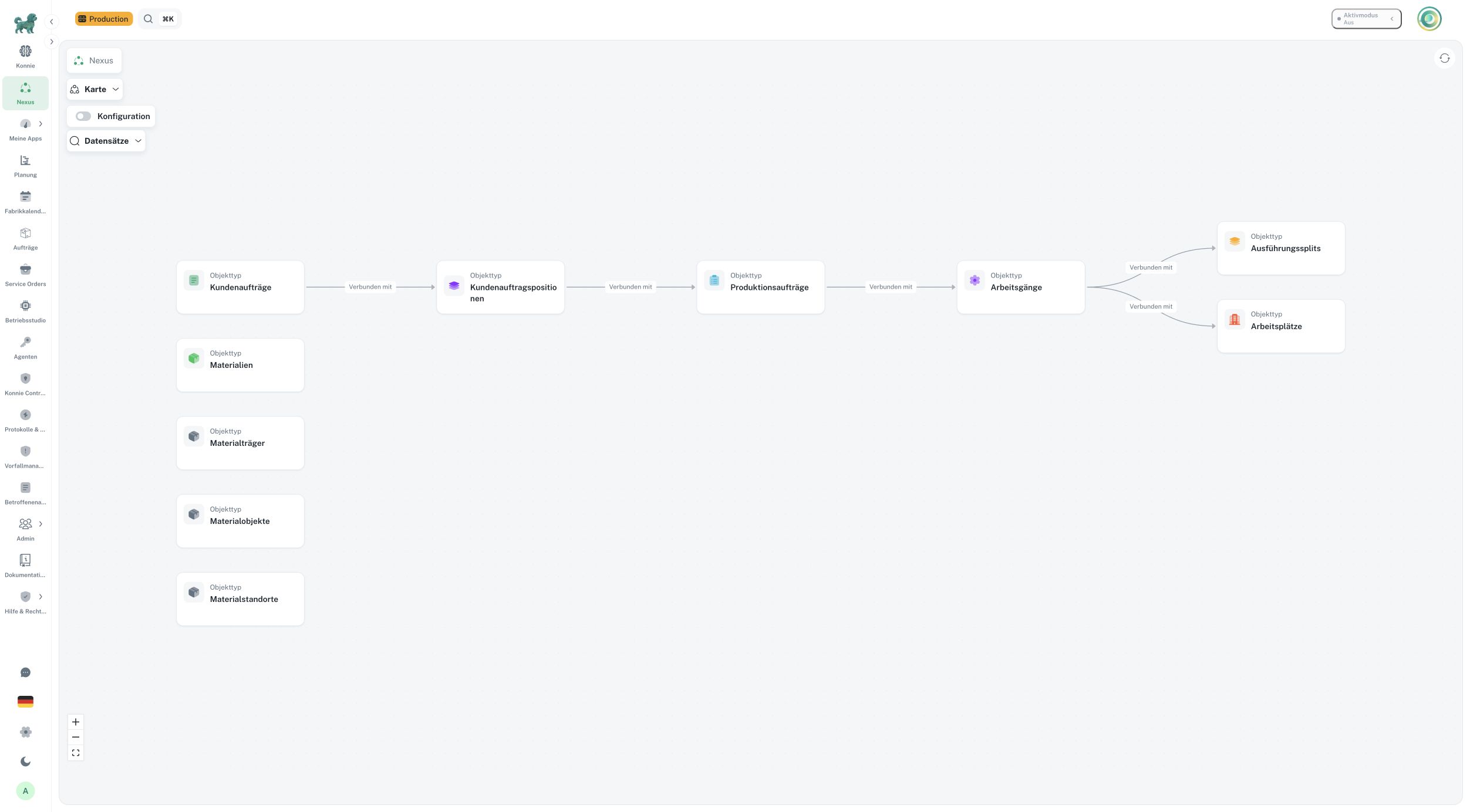
The type map explains configuration connections. Screenshot: German interface.
What can be explored
The current record finder supports customer orders and positions, production orders, operations, execution splits, work centers, materials, Material Objects, Material Holders and Material Locations. Actual availability depends on accessible records and configured canonical identities.
A type can appear in the configuration map even when its individual records are not connected to Nexus. The explorer states this limitation instead of presenting an empty operational history as proof that none exists.
Keep the source authoritative
Use the destination control to open an order, material, work center, definition or configuration in its existing workflow. Rescheduling, cancellation, quantity reporting and configuration changes are performed there with current permissions and validation.
Nexus does not create a second operational database. A record map is a bounded view of current accessible sources. Missing links, old observations and retrieval limits need interpretation through Coverage and the source record.
Continue with exploring records and configuration and connected sources.