Maintenance evidence and inspections
Use an order's Documentation for supporting files and reports. Use Maintenance → Evidence & inspections to find records across machines and orders. Existing source permissions apply to reads, links and exports.
Understand the records
| Record | Purpose |
|---|---|
| App input | Questions, measurements and checks collected by the App through its authorized destination. |
| Finalized report | A document with its existing report/template lifecycle. |
| Attached file | An original PDF, photo or supported file, including contractor documentation. |
| Inspection certificate | Issuer, reference, validity dates and evidence with verification/history. |
The App owns what to collect, its conditions and when to offer completion. There is no separate Form definition or centrally configured checklist/evidence-slot policy. Canonical access, lifecycle, stock, review, external acceptance and return-to-service rules remain authoritative.
Record observations and files
Complete the App's inputs and check its actual save state. Use the authorized maintenance file/evidence operations for supporting documentation and the normal report workflow where a report is needed. Submission and uploads require a connection. Preserve the original request identity when a result is unconfirmed; do not submit a duplicate to recover a lost response.
Under Files, choose Add file, select a supported file and enter a useful title/category. Open or download the saved attachment to verify it. A selected file is not a completed upload. Existing evidence retention and access controls apply; a new App draft does not rewrite accepted historical evidence.
External companies
The internal assignee, internal recorder and external person who performed the work are different roles. An authorized internal user records contractor work; this flow does not provide a contractor guest portal.
- Select the external company and actual performer/date when relevant to your App workflow.
- Record the observations and supporting contractor documents the task calls for.
- Record completed external work only after the documented work is done.
- Another authorized person explicitly accepts external work.
- Carry out the separate return-to-service action when required.
Recording work does not claim the internal recorder physically inspected the machine. Independent external acceptance and canonical review/release remain separate from App input validation. Report editing is its own workflow; generic data entry does not create a signed report automatically.
Record an inspection certificate
Attach a file or link a finalized report first. A historical submitted Form on its own is not selectable as certificate evidence; generate and link its report or attach the appropriate source file when a certificate needs that proof.
- In Documentation → Inspection certificates, choose Record inspection.
- Enter the title, Issued by, Certificate reference and Inspection date.
- Set Valid until and Next inspection when applicable. These are separate dates: a planned next inspection need not be the certificate's expiry date.
- Select the linked Supporting evidence and save the draft.
- An authorized person inspects the record and evidence, confirms the review and chooses Verify.
Verification records an internal review of the inspection record. It does not issue an external certification or replace a required formal signature. These records help assemble audit evidence; they do not automatically establish ISO or other regulatory compliance.
Use Create correction with a reason on a verified record to prepare a replacement draft. The prior verified revision stays intact until the replacement is verified; it then becomes Superseded. Withdraw also requires a confirmation and reason and preserves the withdrawn record in history.
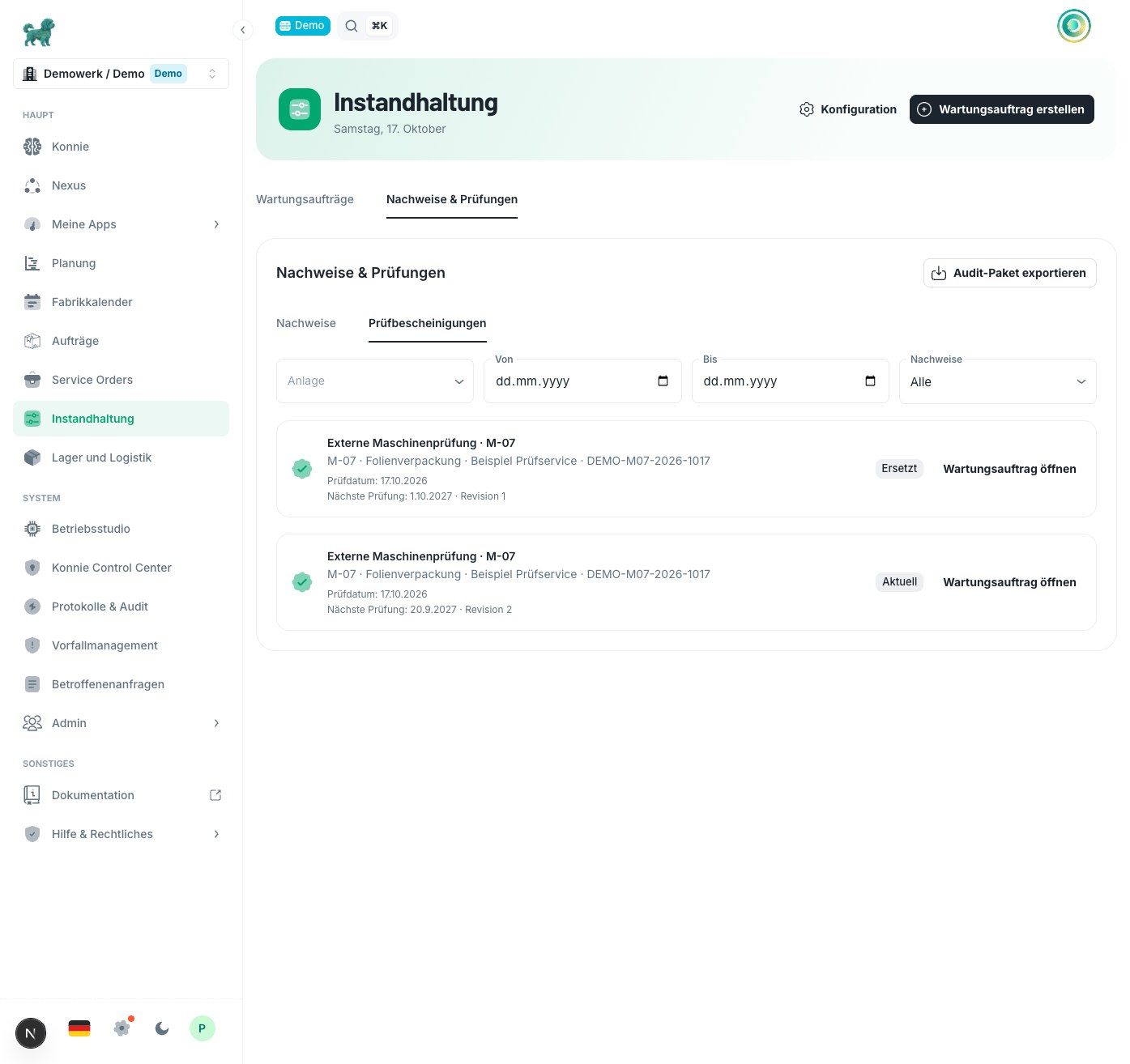
German interface with fictional demonstration data.
Find and export audit evidence
Open Evidence & inspections, then choose Evidence for work-order documentation or Inspection certificates for inspection records. Filter by asset, period and the available missing, verification or due state.
The period has different meanings in the two views:
- Evidence uses the actual external performance date when recorded, otherwise completion, otherwise order creation. From/Until includes the selected local calendar days, not the order's deadline or scheduled window.
- Inspection certificates uses the inspection date. Due / overdue separately finds verified records whose validity or next inspection falls within the next 30 days, including overdue records. The period is not a next-due date range.
Choose Export audit packet for the current filters. The ZIP includes a readable index and manifest, the selected orders' authorized original files, submitted Form PDFs, finalized report PDFs and relevant certificate history. It covers matching pages, not just the rows currently visible. A certificate export retains selected certificate families and their linked work orders so the current record can be read alongside its corrections.
An export is limited to 100 work orders and 300 certificate records. The ZIP can contain up to 300 entries, including its index and manifest, and 128 MiB of uncompressed content including metadata. Narrow the machine or period if the export is too large. Missing or inaccessible originals fail the packet explicitly rather than producing a ZIP that silently omits them. Someone who can view an order may still lack permission to export one of its linked sources.
Recovery
| Problem | Next step |
|---|---|
| Required evidence is missing | Check the saved App evidence, source record, file availability and report finalization. |
| A file appears after an interrupted upload | Reload the order and inspect it before choosing the same file again. |
| A report cannot be linked | Confirm the correct order/machine, current finalized revision, template and source access. |
| External acceptance is unavailable | Check completion, evidence, reviewer access and that the reviewer is a different person. |
| Certificate verification is blocked | Link valid supporting evidence and reopen the latest draft revision. |
| Release becomes blocked after a report correction | Link the eligible replacement and obtain another independent acceptance. |
| Export is too large or a source cannot be read | Reduce the filters or restore the source's legitimate access/availability, then export again. |
Keep required source records available under your organization's retention rules. For an unresolved problem, provide the work-order number, certificate reference, site/environment and failed action to your administrator or support.